


KosherScan
4.47.00 Reviews
App Specs
- Version
- 1.9.7
- Updated On
- License
- Free
- Downloads
- 50,000+
- Developer
- Ephraim Hammer
- Categories
- Shopping
- Platform
- Android
Screenshots
 Analysis by AppCompare
I often find kosher decisions hardest in the ordinary moments: a familiar-looking snack with a new label, a product I have not bought before, or a shopping trip when I do not have time to research every item. That is the gap KosherScan is meant to fill. It is a free shopping app by Ephraim Hammer, built around checking products by barcode and getting guidance about their kosher status. I see its best role as a quick reference at the shelf, not a replacement for the standards or advice I rely on for more involved questions.
When a quick check helps most
Imagine I am shopping for a family gathering and someone asks me to pick up a packaged treat. I know the brand, but not this particular product, and the packaging has changed since I last saw it. Rather than guessing from the front of the box, I can use the barcode as a starting point. That is a useful distinction: the app can help me identify what I am holding, while the label and my own community’s guidance still matter when the decision depends on details beyond a basic product lookup.
This makes the app especially appealing to people who regularly compare packaged foods, shoppers who are learning which products they can buy, and anyone who wants a faster first check while away from home. It is less suited to someone expecting a complete explanation of every ingredient, production line, or certification question from one scan. I would keep it in the role of a convenient helper, especially when the item is unfamiliar, rather than treating a quick answer as a universal ruling.
From barcode to a useful decision
The practical workflow is simple: find the barcode, scan it, review the result, and decide whether it answers the question I actually have. If I am preparing a list at home, manual product search can be more comfortable than scanning items one at a time. Saving products can also make repeat shopping easier: I can keep a reference to things I buy regularly instead of treating every trip as a fresh investigation. That small change is most valuable for staples, where the same products turn up week after week.
For a less familiar item, I would slow down after the first result. A scan is an efficient way to reach product information, but it is still worth checking that the item in my hand matches the one shown, particularly if the package or variety differs. When the app offers certification or company background, I can use that context to make a more informed decision instead of stopping at a simple status label. My useful habit is to treat the scan as the beginning of the check, then read enough to see whether the result fits the exact product and the standards I follow.
That extra pause also helps with a common shopping mistake: assuming that two products from the same brand share the same status. A saved item or a search result can speed up a later trip, but I would still match the product name and package details before relying on it. For a shopping list, I can search at home, save dependable repeat purchases, and leave the unfamiliar or uncertain choices for a closer check in the aisle. It is a more deliberate workflow than scanning everything indiscriminately, and it keeps the app useful without making it the sole decision-maker.
Where the answer goes next
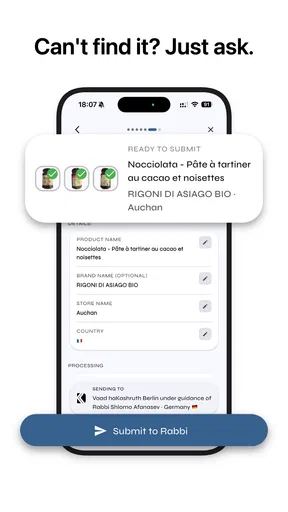
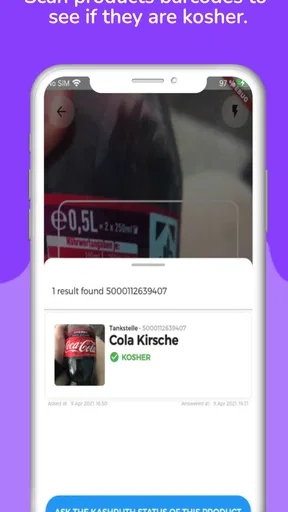
The store summary describes a further handoff: when a shopper has a question about whether something is kosher, the app can connect that question to a rabbi for an answer. That matters because not every shopping decision is a simple lookup. A person may want clarification about a product or how to interpret the information they have found. I would use this route for a genuine question rather than assume every scan leads to an instant personal response; the app’s value is partly that it offers a path beyond the barcode when a straightforward result is not enough.
Worth Reading Before You Choose

Flipboard Shows What News Apps Must Do Beyond the Feed

Switching to Android Auto Means Rethinking Your Driving Routine

Google Calendar Makes a Crowded Week Easier to Manage

Ludo King Makes the Most of the Minutes Between Plans

Baby Panda World Brings Quick Play to Modern Phones, but Its Game Library Feels Busy

ESPN’s Live Game View Makes Following Close Games Easier
That handoff is also where expectations should stay realistic. A product check and a question for a rabbi are different kinds of help: one is a quick shopping reference, while the other is a chance to ask for guidance. If I am buying for someone else, I would make the relevant standard clear before relying on an answer, since “kosher” can be applied according to different levels of observance. For a simple repeat purchase, scanning or checking a saved item may be enough; for a decision that depends on personal practice, I would value the chance to ask rather than infer more than the app tells me.
Getting Started with KosherScan
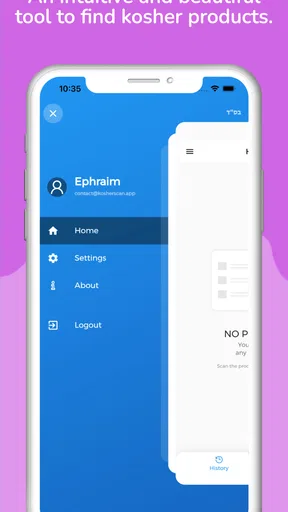
The first thing I noticed when I downloaded the app was the clean and straightforward interface. It's super user-friendly, which is a huge plus in my book. Once you open it, you're greeted with a simple option to scan a barcode. I mean, how much easier can it get?
Setting it up was a breeze. It doesn't bombard you with endless sign-up forms or annoying ads. You just install it, and boom—you're ready to start scanning away. If you're like me and have limited patience for overly complicated apps, you'll appreciate this.
The Scanning Magic
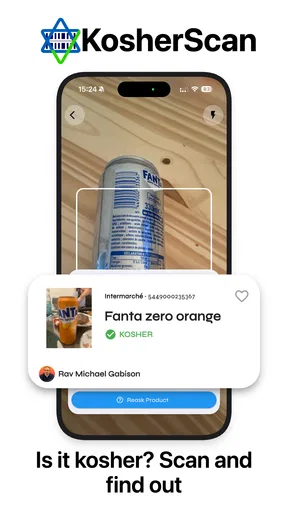
Here's where the magic happens. You grab any product, point your camera, and scan the barcode. In a matter of seconds, you get the kosher status of the item. It's like having a personal kosher assistant in your pocket. The app pulls data from a massive database, so it's pretty reliable.
Now, I did put it to the test with a variety of products, from snacks to household items, and it handled them like a champ. Even when I tried some obscure brands, it still managed to provide accurate information. That’s something that really impressed me.
Features That Stand Out
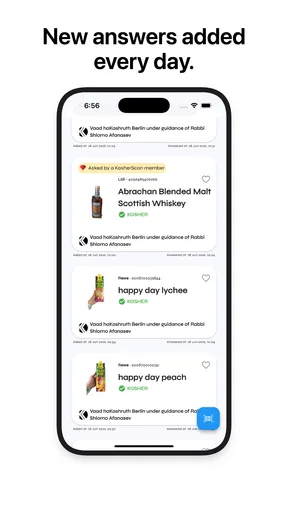
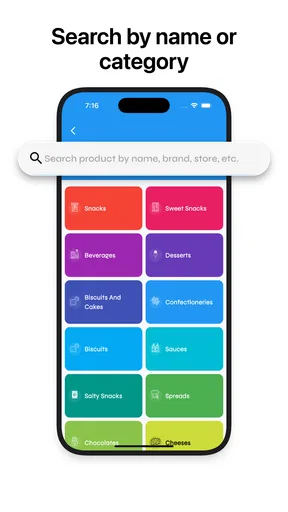
Besides the main scanning functionality, KosherScan offers a few other neat features. For instance, there’s a search option where you can manually look up products. This is great if you’re at home planning your shopping list. Another cool feature is the ability to save your scanned items. This way, you can keep track of your favorite kosher products without having to rescan them each time.
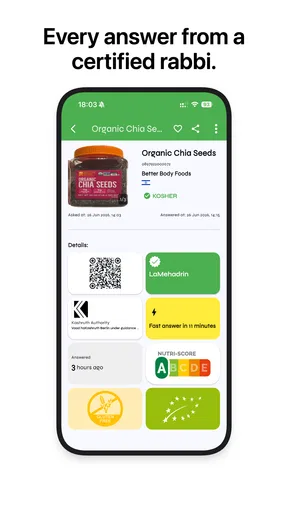
One thing I found particularly helpful is the option to get more detailed product information. It doesn't just stop at telling you whether something is kosher—it dives deeper. You can learn about the kosher certification and even get some background on the company. This adds a layer of transparency that I really value.
A Few Thoughts
Now, no app is perfect, right? While KosherScan is incredibly handy, I did notice a couple of hiccups. Sometimes, the app takes a bit longer to fetch information, especially if you have a spotty internet connection. It's not a deal-breaker, but something to keep in mind. Also, while the database is extensive, there were a couple of really niche items it didn't recognize. But honestly, that's pretty rare.
Overall, though, these are minor issues compared to the convenience it offers. The peace of mind knowing you’re following your dietary guidelines without hassle is worth it.
Choosing it over other shopping habits
Compared with checking packaging alone, KosherScan offers a quicker route from an unfamiliar barcode to relevant product information, and its saved-item option can make repeat purchases less tedious. Compared with a broad web search, it keeps the task focused on a specific product rather than sending me through unrelated pages. Those advantages are practical, not absolute: I still want to inspect the actual package, and a search or scan cannot settle every question about how a product fits my own practice.
For someone who already knows a trusted set of products and rarely experiments, a personal shopping list or familiar certification marks may be enough. The app becomes more useful when I am comparing unfamiliar options, helping another household member shop, or trying to confirm a product while standing in a busy aisle. I would not use it to make assumptions about unlisted products or to replace direct guidance when the issue is more complicated than identifying an item.
Cost, compatibility, and expectations
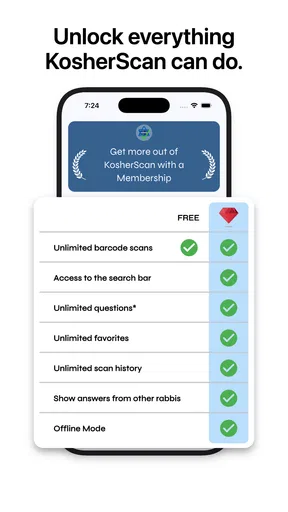
The app is free to install, with in-app purchases listed from $5.49 to $54.99 per item. I would begin with the free experience and see whether barcode checks, searching, and saved products suit my routine before considering any paid option. Its Teen content rating is useful context for households deciding who can use it, while the current version is 1.9.7 and the minimum operating system is 7.0. Those details make it easier to judge basic fit before relying on it for a shopping trip.
Its average rating is 4.4 from around 1.3 thousand ratings, and it has over 50 thousand installs. I take that as a sign that other shoppers have found a use for it, not as proof that every product lookup will be complete or that every household will interpret results the same way. The practical test is whether the products I buy show up clearly and whether the information is useful for the standards I follow.
Before heading out, I would try a couple of products I already recognize. That lets me see how the result is presented and learn where the certification details appear, without making a high-stakes decision on an unfamiliar item. At the store, I would use the barcode when it is easy to reach; if the package is awkward to handle or the connection is unreliable, I would fall back on the label and my usual sources rather than hold up the trip. A saved reference is handy, but it should not make me overlook a changed product or package.
Who should keep it close
KosherScan is a sensible companion for shoppers who want a quick product lookup, like keeping track of regular purchases, or sometimes need a route to ask a rabbi about a question. It is less compelling if I expect an exhaustive authority for every ingredient or if I prefer to rely entirely on a specific certifying body’s own resources. In those cases, the app can still be a starting point, but a label or direct source may be the better final check.
For me, its strongest use is modest and clear: it can reduce the friction of checking an everyday packaged product, help me build a more dependable routine for repeat buys, and point me toward further guidance when a barcode result is not enough. The value comes from using each part for the right job—scan to identify, read the details to understand, and ask when the decision needs a person’s judgment.
Final Thoughts
So, would I recommend KosherScan? Absolutely. Whether you're strictly kosher or just looking to be more mindful about what you buy, this app is a fantastic tool. It’s like having a rabbi in your pocket, guiding you through your shopping sprees.
In a world where time is of the essence, and everyone is rushing about, having such a quick and reliable way to check kosher status is invaluable. So, next time you're at the store and unsure about a product, just whip out your phone and let KosherScan do the work. Trust me, you'll wonder how you ever managed without it.
Pros
- Extensive database of kosher products.
- User-friendly interface for easy navigation.
- Real-time updates on kosher status.
- Barcode scanning for quick product info.
- Multilingual support for diverse users.
Cons
- Limited offline functionality.
- Occasional scanning inaccuracies.
- Some features require premium access.
- Requires internet for full use.
- Not all products are listed yet.
FAQs for KosherScan
What is KosherScan and how does it work?
KosherScan is a mobile application designed to help users identify kosher-certified products easily. By utilizing a barcode scanning feature, the app allows users to quickly check if a product complies with kosher dietary laws. It provides detailed information about certification, ingredients, and the certifying agency, assisting users in making informed purchasing decisions.
Is KosherScan available for both Android and iOS devices?
Yes, KosherScan is available for both Android and iOS platforms. Users can download it from the Google Play Store or the Apple App Store. The app is designed to work seamlessly on various devices, ensuring a user-friendly experience regardless of the operating system you prefer.
Does KosherScan require an internet connection to work?
KosherScan primarily requires an internet connection to access and update its extensive database of kosher-certified products. While some features may work offline, real-time product verification and updates need a stable internet connection to provide accurate and up-to-date information.
How accurate is the information provided by KosherScan?
KosherScan strives to provide accurate and reliable information by continuously updating its database with the latest certifications and product data. However, users are encouraged to double-check products, especially if they have specific dietary concerns, as changes in certification status can occur without immediate updates.
Is there a cost associated with using KosherScan?
KosherScan offers a free version with basic features, allowing users to scan and check products for kosher certification. However, there may be premium features available through in-app purchases or subscriptions, offering enhanced functionalities such as detailed product histories and personalized alerts.


